
TouchBistro POS: Restaurant Guide to Features, Pricing, and Fit
TouchBistro targets independent restaurants and bars that want iPad-native table service without enterprise Toast complexity. It shows up in searches for "restaurant POS iPad" and "bar POS system" for good reason—if your floor plan fits its strengths.
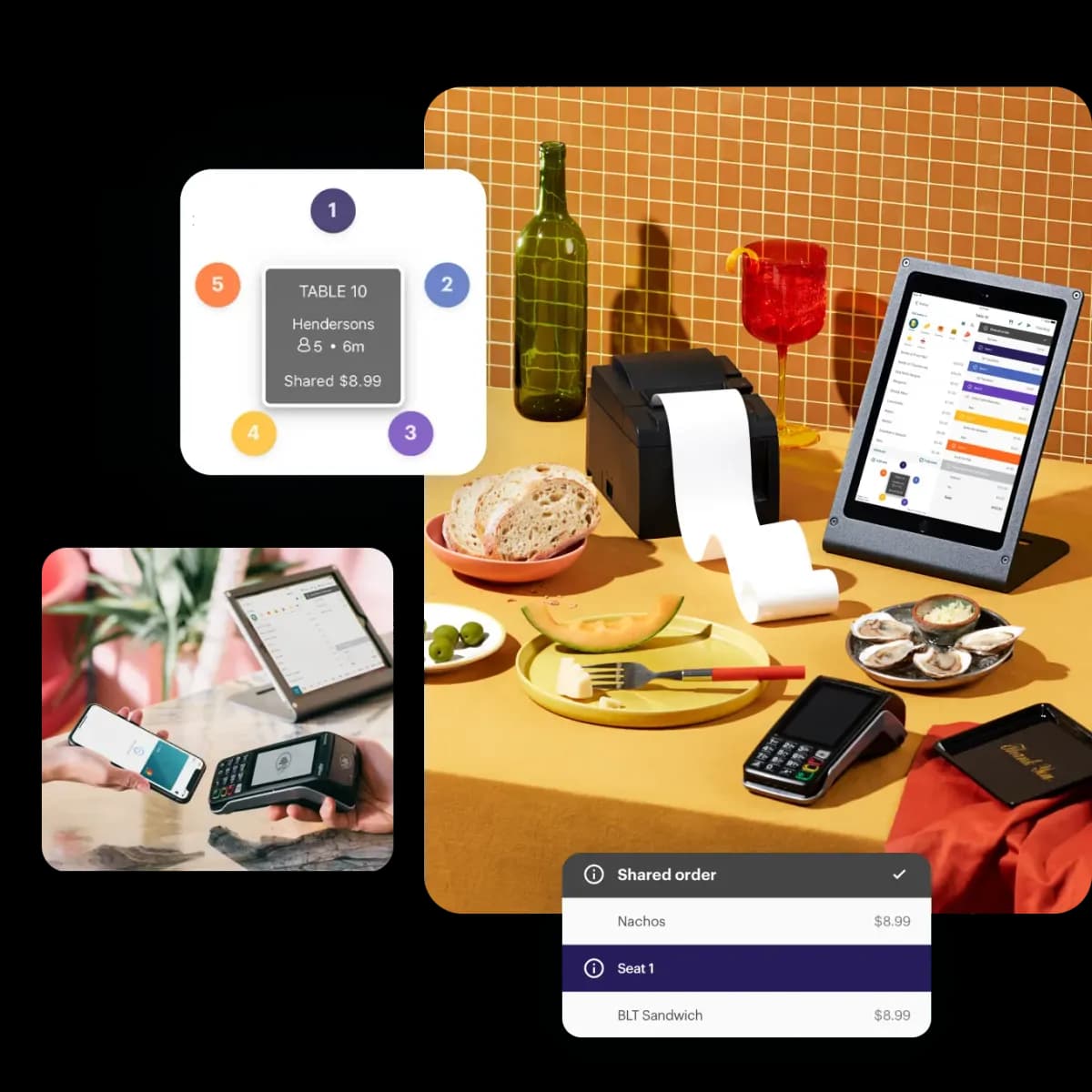
TouchBistro runs on iPads with a restaurant-first UI: floor plans, split checks, coursing, and bar tabs. It suits full-service dining, cafes with table service, and neighborhood bars more than high-volume QSR drive-thrus. Hardware is Apple-based, so budget for sturdy stands, kitchen printers, and backup devices—consumer tablets without cases do not survive a busy Friday service.
Features owners ask about
- Visual floor plans and table status at a glance.
- Menu modifiers and coursing for kitchen timing.
- Bar tab and pre-authorization workflows.
- Reporting on labor, food cost integrations, and void tracking.
- Optional add-ons: online ordering, reservations, and loyalty.
TouchBistro vs Toast vs Clover
Toast is deeper for multi-location franchises and enterprise restaurant ops. Clover is broader across retail and QSR with a large app store. TouchBistro sits in the independent full-service lane—easier than Toast for a single-location bistro, more table-native than Clover for a wine bar. Compare monthly software, payment processing integration, and whether your chef needs a full KDS or just kitchen printers.
Implementation tips
Map your menu modifiers before import—cocktail builds and dietary mods multiply fast. Train servers on split checks and void permissions day one. Confirm offline behavior if your internet is unreliable; iPad POS systems depend on local network quality. Croft helps Gulf Coast restaurants pair TouchBistro or alternatives with transparent processing so tips, batches, and deposits reconcile cleanly.
Croft Business Solutions helps with TouchBistro and restaurant POS deployment with interchange-plus processing and tip workflow setup. We explain options in plain language, review statements when useful, and stay one call away, not a ticket queue.
TouchBistro earns its search traffic from independents who want approachable table service POS. Validate processing costs and backup hardware before you sign—software fit is only half the register experience.
Who TouchBistro is best for
Merchants searching for TouchBistro usually care about a specific workflow—inventory sync, table service, field sales, or bundled marketing—not generic "best POS" lists. Toast for multi-location restaurants, TouchBistro for independent table-service, Clover for hybrid retail. Demo with your rush-hour scenario and your top twenty SKUs before you commit.
Processing and effective rate
POS software fees are only half the contract. Bundled processing can hide markup behind "simple" pricing. Pull effective rate from statements: total fees divided by card sales. If you are quoted bundled rates, ask what happens when card mix shifts toward rewards or commercial cards.
- Ask whether you can use a third-party processor or must stay on the default integration.
- Confirm deposit timing for tips, batches, and holidays.
- Verify chargeback and retrieval support—not all POS vendors handle disputes the same way.
- Plan hardware replacement costs: readers, printers, and handhelds over three years.
How to audit your processing costs
Pull your last three months of statements and calculate effective rate: total fees the processor kept divided by total card sales. List every monthly line item—PCI, gateway, statement, regulatory—and note downgrades on keyed or chip-fallback transactions. That single exercise beats comparing teaser qualified rates from sales brochures.
- Compare effective rate month over month; spikes often follow rate changes or card-mix shifts.
- Separate interchange (wholesale) from markup if you are on interchange-plus.
- Count keyed versus chip-present volume; keyed and MOTO categories cost more.
- Verify batch close times—open batches can delay funding or cause reconciliation gaps.
Our guide on reading your merchant statement walks through each section. If numbers still do not reconcile, upload statements for a Croft review before you renew or switch.
Croft Business Solutions helps with POS selection, hardware programs, and processing that matches your volume. We explain options in plain language, review statements when useful, and stay one call away, not a ticket queue.
Croft Business Solutions boards merchants nationwide with interchange-plus pricing, dual pricing and compliant cost-recovery programs, free POS placement for qualified businesses, and hands-on support on the Gulf Coast and throughout North Georgia. Start with a free statement audit or instant quote if you know your monthly volume.
Why this matters for your bottom line
Card processing is not a fixed utility bill. Effective rate—total fees divided by card sales—shifts with card mix, ticket size, and whether staff consistently use chip and contactless. Merchants who audit statements quarterly catch drift before renewal season; those who only compare teaser qualified rates often overpay for years.
Practical next steps
- Calculate effective rate from your last three statements.
- List monthly fixed fees: PCI, gateway, software, equipment.
- Note keyed vs chip-present volume and any downgrades.
- Compare your program to interchange-plus transparency.
- Request a free statement audit before you renew.
How Croft helps
Croft Business Solutions partners with Omega Bank Card Services to offer interchange-plus pricing, compliant dual pricing, free POS placement for qualified merchants, Clover and countertop terminals, and gateways for omnichannel sales. We explain programs in plain language and stay reachable after onboarding—not a ticket queue.
Pull your last three months of statements and calculate effective rate: total fees the processor kept divided by total card sales. List every monthly line item—PCI, gateway, statement, regulatory—and note downgrades on keyed or chip-fallback transactions. That single exercise beats comparing teaser qualified rates from sales brochures.
- Compare effective rate month over month; spikes often follow rate changes or card-mix shifts.
- Separate interchange (wholesale) from markup if you are on interchange-plus.
- Count keyed versus chip-present volume; keyed and MOTO categories cost more.
- Verify batch close times—open batches can delay funding or cause reconciliation gaps.
Our guide on reading your merchant statement walks through each section. If numbers still do not reconcile, upload statements for a Croft review before you renew or switch.
Croft Business Solutions helps with transparent processing, POS placement, and statement reviews. We explain options in plain language, review statements when useful, and stay one call away, not a ticket queue.
Croft Business Solutions boards merchants nationwide with interchange-plus pricing, dual pricing and compliant cost-recovery programs, free POS placement for qualified businesses, and hands-on support on the Gulf Coast and throughout North Georgia. Start with a free statement audit or instant quote if you know your monthly volume.
Search rankings follow useful, specific content—but your business wins when checkout is reliable and fees are auditable. Use this guide as a checklist, then talk to a partner who will show the math.
Frequently asked questions
- Can I keep my processor if I change POS?
- Sometimes. Compatibility depends on POS, gateway, and sponsor bank. Share your current stack when requesting a quote so migration is planned—not guessed.
- Is free POS hardware really free?
- Often it is subsidized through processing commitment. Compare effective rate over 36 months against buying hardware outright with interchange-plus pricing.
- How do I compare processors fairly?
- Use effective rate on your actual statements, include all monthly fees, and compare funding speed and support—not brochure qualified rates.
- Does Croft work with my existing POS?
- Often yes, depending on POS and gateway. Share your current stack when requesting a quote so integration and migration are planned upfront.
Related reads
POS systems
Clover vs. Square vs. Toast: Which POS Fits Your Business?
Compare Clover, Square, and Toast for small businesses: hardware, pricing, industry fit, and processing integration so you pick a POS that matches how you sell.
POS systems
Retail vs. Restaurant POS: Why One Size Doesn't Fit All
Retail and restaurant POS needs differ: inventory, modifiers, tipping, kitchen routing, and reporting. Learn why a generic system often costs more in workarounds.
POS systems
NCR Aloha POS: Still Relevant for Restaurants in 2026?
NCR Aloha POS guide for restaurants: on-prem vs cloud, legacy installs, migration paths, and when full-service brands stay on Aloha vs switch to Toast or SkyTab.
Want a second opinion on your statement?
We review what you pay today, line by line, and show how transparent pricing compares, no obligation to switch.