
PAX A80 Review for Small Business
Cost-effective countertop payment device with 4" HD touchscreen and built-in thermal printer. Here is how PAX A80 fits common small-business checkout needs and what to ask before you place hardware.
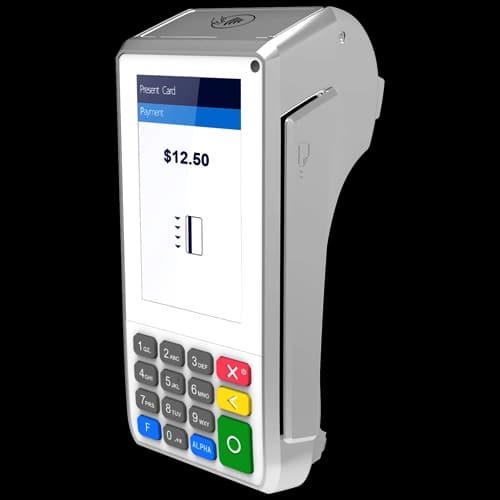
PAX A80 from PAX is a countertop payment terminal used by restaurants, retail, and service businesses that need reliable EMV chip, contactless tap, and clear batch reporting. Cost-effective countertop payment device with 4" HD touchscreen and built-in thermal printer. This review covers who the PAX A80 fits, how it pairs with processing programs, and what to budget beyond the hardware sticker price.
Croft offers PAX A80 to qualified merchants with transparent interchange-plus processing. See full specs, pricing context, and ordering on our PAX A80 equipment page.
What the PAX A80 does at checkout
The PAX A80 captures card data at the point of sale, applies tip and tax logic from your POS or standalone batch, and settles funds through your merchant account. Modern PAX devices support chip, swipe where still allowed, NFC contactless including Apple Pay and Google Pay, and PIN debit when your program and keys support it. Staff should be trained on chip-first habits—swipe fallback and keyed entry trigger higher interchange categories on many programs.
Specifications and standout features
- 4" HD touchscreen and physical keypad
- Built-in high-speed thermal printer
- Quad-core Cortex-A53, Android
- EMV chip, magstripe, NFC contactless
- Ethernet, Wi-Fi, Bluetooth, optional 4G
Connectivity and placement
PAX A80 is built for fixed checkout lanes, front desks, and back-office counters. Ethernet provides the most stable connection for high-volume locations; Wi-Fi works when cabling is impractical. Plan countertop space, cable routing, and whether a PIN pad pairs with a base unit on split setups.
Who should shortlist this terminal
- Merchants who want PAX hardware with a dedicated merchant account—not aggregator-only pricing.
- Retail, restaurant counters, and professional offices with steady in-person card volume.
- Businesses ready to program dual pricing or compliant cost recovery at the device when card mix is high.
- Operators who reconcile batches daily and want deposits mapped cleanly to accounting.
When to consider alternatives
A basic mobile reader may suffice for micro-volume pop-ups. Full Clover POS stacks make sense when inventory, kitchen routing, or app marketplace integrations matter more than terminal-only capture. If you only invoice by phone, a virtual terminal gateway may beat dedicated hardware until in-person volume justifies placement.
Processor compatibility
Not every terminal boards on every sponsor bank or gateway. Share your industry, monthly volume, and whether you need QuickBooks, recurring billing, or multi-location reporting when you request a quote so hardware and processing are quoted together.
Total cost beyond the device
Hardware is one line item. Include monthly gateway fees, PCI compliance, software subscriptions if paired with POS, and your effective processing rate. Our article on the true cost of free terminals explains how leases and bundles hide margin in processing. Compare three-year total cost, not device price alone.
How to audit your processing costs
Pull your last three months of statements and calculate effective rate: total fees the processor kept divided by total card sales. List every monthly line item—PCI, gateway, statement, regulatory—and note downgrades on keyed or chip-fallback transactions. That single exercise beats comparing teaser qualified rates from sales brochures.
- Compare effective rate month over month; spikes often follow rate changes or card-mix shifts.
- Separate interchange (wholesale) from markup if you are on interchange-plus.
- Count keyed versus chip-present volume; keyed and MOTO categories cost more.
- Verify batch close times—open batches can delay funding or cause reconciliation gaps.
Our guide on reading your merchant statement walks through each section. If numbers still do not reconcile, upload statements for a Croft review before you renew or switch.
Croft Business Solutions helps with placing PAX A80 with interchange-plus processing and statement support. We explain options in plain language, review statements when useful, and stay one call away, not a ticket queue.
Croft Business Solutions boards merchants nationwide with interchange-plus pricing, dual pricing and compliant cost-recovery programs, free POS placement for qualified businesses, and hands-on support on the Gulf Coast and throughout North Georgia. Start with a free statement audit or instant quote if you know your monthly volume.
PAX A80 is a solid choice when connectivity, form factor, and sponsor compatibility match how you sell. Pair the right terminal with auditable pricing and reachable support—that combination outlasts any single hardware generation.
Why this matters for your bottom line
Card processing is not a fixed utility bill. Effective rate—total fees divided by card sales—shifts with card mix, ticket size, and whether staff consistently use chip and contactless. Merchants who audit statements quarterly catch drift before renewal season; those who only compare teaser qualified rates often overpay for years.
Practical next steps
- Calculate effective rate from your last three statements.
- List monthly fixed fees: PCI, gateway, software, equipment.
- Note keyed vs chip-present volume and any downgrades.
- Compare your program to interchange-plus transparency.
- Request a free statement audit before you renew.
How Croft helps
Croft Business Solutions partners with Omega Bank Card Services to offer interchange-plus pricing, compliant dual pricing, free POS placement for qualified merchants, Clover and countertop terminals, and gateways for omnichannel sales. We explain programs in plain language and stay reachable after onboarding—not a ticket queue.
Pull your last three months of statements and calculate effective rate: total fees the processor kept divided by total card sales. List every monthly line item—PCI, gateway, statement, regulatory—and note downgrades on keyed or chip-fallback transactions. That single exercise beats comparing teaser qualified rates from sales brochures.
- Compare effective rate month over month; spikes often follow rate changes or card-mix shifts.
- Separate interchange (wholesale) from markup if you are on interchange-plus.
- Count keyed versus chip-present volume; keyed and MOTO categories cost more.
- Verify batch close times—open batches can delay funding or cause reconciliation gaps.
Our guide on reading your merchant statement walks through each section. If numbers still do not reconcile, upload statements for a Croft review before you renew or switch.
Croft Business Solutions helps with transparent processing, POS placement, and statement reviews. We explain options in plain language, review statements when useful, and stay one call away, not a ticket queue.
Croft Business Solutions boards merchants nationwide with interchange-plus pricing, dual pricing and compliant cost-recovery programs, free POS placement for qualified businesses, and hands-on support on the Gulf Coast and throughout North Georgia. Start with a free statement audit or instant quote if you know your monthly volume.
Search rankings follow useful, specific content—but your business wins when checkout is reliable and fees are auditable. Use this guide as a checklist, then talk to a partner who will show the math.
Frequently asked questions
- Is the PAX A80 right for a new business?
- If you expect steady in-person card volume from day one, PAX A80 provides proper EMV and contactless acceptance with room to grow. Very low-volume startups may start simpler, but restaurants and retail usually outgrow phone readers within months.
- Does PAX A80 work with Clover or other POS systems?
- Many terminals integrate via gateway or semi-integration depending on your POS. Confirm compatibility before buying—Croft can map device, gateway, and POS together for qualified merchants.
- Can I use dual pricing on this terminal?
- Yes, when your processing program and terminal firmware support compliant dual pricing or cash discount programming. Signage, receipts, and terminal logic must match—Croft programs devices during deployment for qualified accounts.
- How do I compare processors fairly?
- Use effective rate on your actual statements, include all monthly fees, and compare funding speed and support—not brochure qualified rates.
- Does Croft work with my existing POS?
- Often yes, depending on POS and gateway. Share your current stack when requesting a quote so integration and migration are planned upfront.
Related reads
Hardware & programs
The True Cost of "Free" Credit Card Terminals
The real cost of free credit card terminals: leases, minimums, and long contracts. What Gulf Coast merchants should ask before accepting no-cost hardware.
POS systems
Choosing a POS System That Grows With Your Business
Pick a POS that scales: second locations, ecommerce, franchise reporting, permissions, and integration roadmaps so you do not outgrow your stack in year two.
POS systems
Cloud-Based vs. Legacy POS Systems: What's the Real Difference?
Cloud vs. legacy POS explained for small business: uptime, updates, offline mode, data ownership, and when an on-premise system still makes sense.

Want a second opinion on your statement?
We review what you pay today, line by line, and show how transparent pricing compares, no obligation to switch.