
Clover Station Duo 2 Review for Small Business
Dual-screen all-in-one POS: 14" HD for staff and an 8" guest touchscreen so customers can confirm the order, tip, redeem rewards, pay, and choose a printed, emailed, or texted receipt. High-speed thermal printer and cash drawer included.
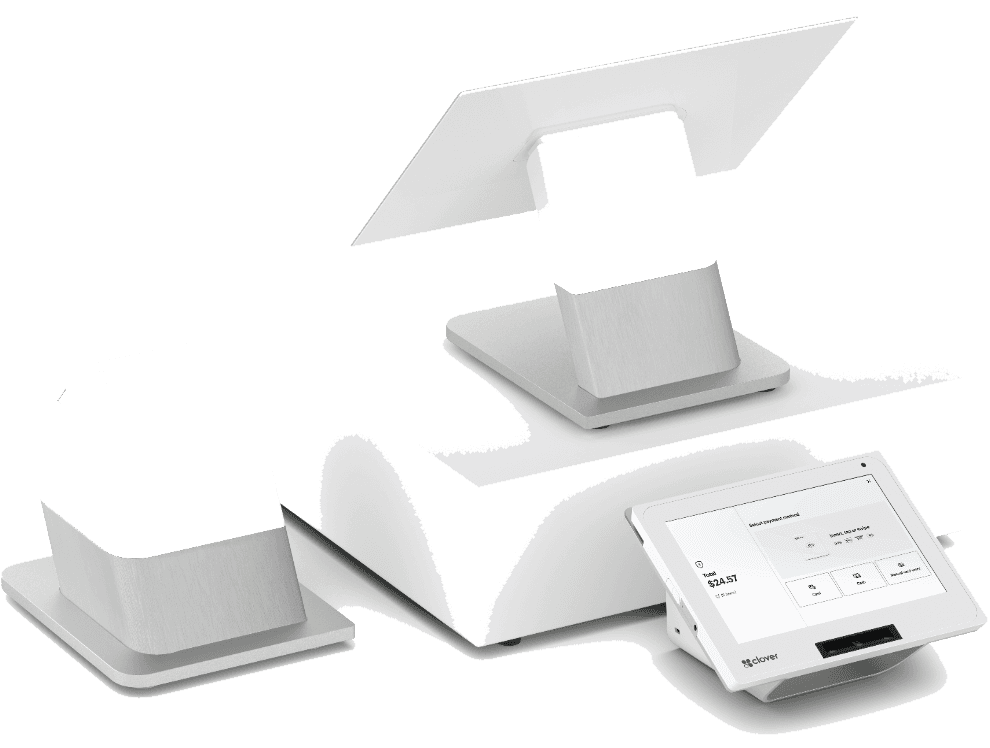
Clover Station Duo 2 is part of the Clover POS ecosystem—hardware, software, and app marketplace designed for restaurants, retail, and service businesses that want one vendor for checkout, reporting, and integrations. Dual-screen all-in-one POS: 14" HD for staff and an 8" guest touchscreen so customers can confirm the order, tip, redeem rewards, pay, and choose a printed, emailed, or texted receipt. High-speed thermal printer and cash drawer included. This guide explains who Clover Station Duo 2 fits, typical total cost, and how Croft helps qualified merchants with placement and processing.
Full device details: Clover Station Duo 2 on Croft. Staff run the order on a 14" screen while guests confirm, tip, redeem, and pay on theirs, with less back-and-forth at rush.
Industries and formats that fit best
- QSR & fast casual
- Counter ordering & cafés
- Delis & sandwich shops
- Bakery & coffee to-go lines
- Retail with customer-facing pay
Clover shines when workflows need modifiers, tips, inventory, or customer engagement—not just card capture. Compare against Square and standalone terminals if your needs are minimal.
Hardware highlights
- 14" HD merchant + 8" customer touchscreens for order confirm, tips, rewards, pay, and receipt choice
- Accept chip, swipe, and contactless: Apple Pay, Google Pay, Samsung Pay, and similar wallets
- Dual 5 MP cameras with built-in scanning software
- High-speed thermal receipt printer; included cash drawer with bill tray, coin tray, keys, and security cable
- Clover Security end-to-end encryption with integrated chip card reading
- Wi-Fi, Ethernet, and 4G/LTE; virtual PIN keypad for debit PIN entry
- Expandable with more Clover countertop and handheld devices, printers, and scanners
Software, apps, and integrations
Clover App Market adds payroll connectors, loyalty, online ordering, and industry tools. Budget monthly software tiers plus any paid apps. Integrations fail when merchants buy hardware first and discover their must-have app is incompatible—demo your top three workflows before signing.
Processing and placement programs
Qualified Croft merchants may receive free Clover POS placement when processing volume and business type align with program rules. Effective rate and contract terms matter more than free hardware headlines—audit net cost after six months of real card mix.
Who should look elsewhere
Single-lane shops with tiny SKU counts may overpay for Clover software. High-risk categories need specialty underwriting regardless of hardware brand. Multi-location enterprise groups may need centralized reporting beyond standard Clover tiers—ask about your roadmap before year one.
How to audit your processing costs
Pull your last three months of statements and calculate effective rate: total fees the processor kept divided by total card sales. List every monthly line item—PCI, gateway, statement, regulatory—and note downgrades on keyed or chip-fallback transactions. That single exercise beats comparing teaser qualified rates from sales brochures.
- Compare effective rate month over month; spikes often follow rate changes or card-mix shifts.
- Separate interchange (wholesale) from markup if you are on interchange-plus.
- Count keyed versus chip-present volume; keyed and MOTO categories cost more.
- Verify batch close times—open batches can delay funding or cause reconciliation gaps.
Our guide on reading your merchant statement walks through each section. If numbers still do not reconcile, upload statements for a Croft review before you renew or switch.
Croft Business Solutions helps with Clover Clover Station Duo 2 placement and transparent processing for qualified businesses. We explain options in plain language, review statements when useful, and stay one call away, not a ticket queue.
Croft Business Solutions boards merchants nationwide with interchange-plus pricing, dual pricing and compliant cost-recovery programs, free POS placement for qualified businesses, and hands-on support on the Gulf Coast and throughout North Georgia. Start with a free statement audit or instant quote if you know your monthly volume.
Clover Station Duo 2 rewards operators who will use POS depth daily. Match device tier to traffic, train staff on tipping and modifiers, and keep processing auditable—that is how Clover deployments succeed past the honeymoon quarter.
Why this matters for your bottom line
Card processing is not a fixed utility bill. Effective rate—total fees divided by card sales—shifts with card mix, ticket size, and whether staff consistently use chip and contactless. Merchants who audit statements quarterly catch drift before renewal season; those who only compare teaser qualified rates often overpay for years.
Practical next steps
- Calculate effective rate from your last three statements.
- List monthly fixed fees: PCI, gateway, software, equipment.
- Note keyed vs chip-present volume and any downgrades.
- Compare your program to interchange-plus transparency.
- Request a free statement audit before you renew.
How Croft helps
Croft Business Solutions partners with Omega Bank Card Services to offer interchange-plus pricing, compliant dual pricing, free POS placement for qualified merchants, Clover and countertop terminals, and gateways for omnichannel sales. We explain programs in plain language and stay reachable after onboarding—not a ticket queue.
Pull your last three months of statements and calculate effective rate: total fees the processor kept divided by total card sales. List every monthly line item—PCI, gateway, statement, regulatory—and note downgrades on keyed or chip-fallback transactions. That single exercise beats comparing teaser qualified rates from sales brochures.
- Compare effective rate month over month; spikes often follow rate changes or card-mix shifts.
- Separate interchange (wholesale) from markup if you are on interchange-plus.
- Count keyed versus chip-present volume; keyed and MOTO categories cost more.
- Verify batch close times—open batches can delay funding or cause reconciliation gaps.
Our guide on reading your merchant statement walks through each section. If numbers still do not reconcile, upload statements for a Croft review before you renew or switch.
Croft Business Solutions helps with transparent processing, POS placement, and statement reviews. We explain options in plain language, review statements when useful, and stay one call away, not a ticket queue.
Croft Business Solutions boards merchants nationwide with interchange-plus pricing, dual pricing and compliant cost-recovery programs, free POS placement for qualified businesses, and hands-on support on the Gulf Coast and throughout North Georgia. Start with a free statement audit or instant quote if you know your monthly volume.
Search rankings follow useful, specific content—but your business wins when checkout is reliable and fees are auditable. Use this guide as a checklist, then talk to a partner who will show the math.
Frequently asked questions
- How much does Clover Station Duo 2 cost per month?
- Clover software tiers, app fees, and processing rates combine into total monthly cost. Croft quotes processing and placement together for qualified merchants—compare effective rate, not software list price alone.
- Can I keep Clover if I switch processors?
- Clover hardware and software are tied to approved processing relationships. If you switch processors, plan a migration timeline—Croft helps merchants evaluate total cost before any move.
- How do I compare processors fairly?
- Use effective rate on your actual statements, include all monthly fees, and compare funding speed and support—not brochure qualified rates.
- Does Croft work with my existing POS?
- Often yes, depending on POS and gateway. Share your current stack when requesting a quote so integration and migration are planned upfront.
Related reads
POS systems
Clover vs. Square vs. Toast: Which POS Fits Your Business?
Compare Clover, Square, and Toast for small businesses: hardware, pricing, industry fit, and processing integration so you pick a POS that matches how you sell.
Equipment & programs
No-Cost POS: What It Really Means for Gulf Coast Businesses
What “no-cost POS” usually means for Gulf Coast merchants, how equipment is included, and what questions to ask so expectations match reality.
POS systems
POS Add-Ons That Actually Pay for Themselves
POS add-ons worth the cost: loyalty, online ordering, kitchen displays, inventory tools, and gift cards—how to estimate payback before you subscribe.
Want a second opinion on your statement?
We review what you pay today, line by line, and show how transparent pricing compares, no obligation to switch.