Dejavoo iPOSpays Payment Gateway for Small Business: Features and Fit
Dejavoo iPOSpays is one of the gateways Croft offers to qualified merchants. The right gateway depends on how you sell—in-store, online, invoiced, or recurring—not on feature checklists alone.
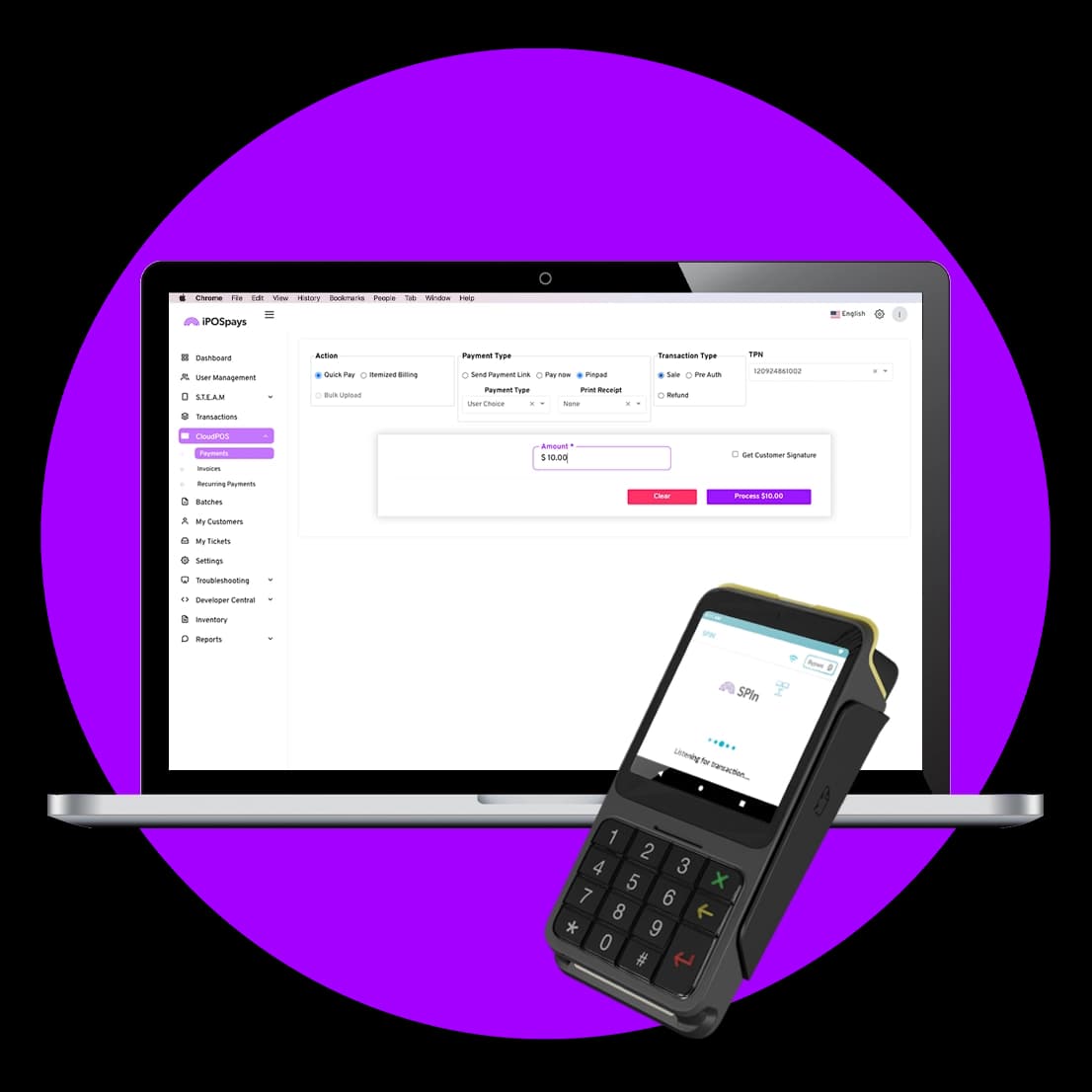
Dejavoo iPOSpays is a payment gateway that routes card-not-present and omnichannel transactions between your website, POS, virtual terminal, and acquiring bank. iPOSpays Cloud POS is built for owners who take orders by phone, email, or appointment and do not want to buy a second point of sale just to key a card. Use a secure virtual terminal on the PC or tablet you already own, email or text customers a pay link when that is faster, and put memberships or installments on autopilot so cash flow stays predictable. When you also sell face-to-face, the same program can pair with Dejavoo chip-and-tap terminals so in-person and card-not-present sales stay under one roof, and you may qualify for better card-present pricing when you dip or tap. Dejavoo positions the broader iPOSpays stack for gyms, restaurants, mobile merchants, auto retail, salons, and professional services, Croft helps you enable only the paths that match your program and software stack. Croft offers Dejavoo iPOSpays to qualified merchants—compare full specs on our Dejavoo iPOSpays gateway page.
How Dejavoo iPOSpays fits your sales channels
Best for: CNP sales, memberships, field & counter checkout. Gateways matter when you sell online, by invoice, over the phone, or on a recurring schedule—not only when a customer taps a card at the counter.
- E-commerce carts and shopping cart plugins.
- Virtual terminal for phone orders and MOTO with proper AVS habits.
- Payment links and QR codes for invoices and deposits.
- Recurring memberships, installments, and card-on-file with consent.
- Card-present lanes when paired with compatible terminals.
Feature summary
- Mobile app for merchants
- Recurring billing and subscriptions
- API and developer integrations
- Hosted payment pages
- QuickBooks integration
- Multi-user logins
- Digital payment links
Compatible equipment
Dejavoo iPOSpays works with terminals including Dejavoo P1, Dejavoo P3, Dejavoo P5, Dejavoo P8, Dejavoo P12, Dejavoo P17, and others. See equipment for device pages and pair hardware quotes with gateway monthly fees.
Key benefits
- Stop turning away “can I pay over the phone?”, key the card safely and email a receipt the same way every time
- Text or email a secure payment link so customers pay on their own time; you see when it is paid without calling to follow up
- Put repeat charges on autopilot, weekly, monthly, or custom, so renewals and installments do not fall through the cracks
- When you add a Dejavoo terminal, customers can dip or tap at the counter while your back office stays on one system
- On the go, Tap to Pay with iPOSgo! lets you accept contactless payments on a supported phone when your deployment supports it, useful for lines, curbside, or field work
- Salons and retail teams can add contactless wallet acceptance and loyalty-style programs (such as Dejavoo Extra) where your program includes them, ask Croft what is turned on for your account
Fees and total cost
Gateway monthly fees, per-authorization costs, and equipment compatibility vary by program. Gateway and feature pricing varies by program; contact Croft for a quote tailored to your business. Include every gateway line item when you calculate effective rate—merchants often forget them when comparing POS-only quotes.
Security and compliance
Tokenization, hosted fields, and PCI scope reduction matter for e-commerce. Use hosted payment pages or token vaults where possible so card data does not touch your servers. Train staff on MOTO fraud signals when taking phone orders.
How to audit your processing costs
Pull your last three months of statements and calculate effective rate: total fees the processor kept divided by total card sales. List every monthly line item—PCI, gateway, statement, regulatory—and note downgrades on keyed or chip-fallback transactions. That single exercise beats comparing teaser qualified rates from sales brochures.
- Compare effective rate month over month; spikes often follow rate changes or card-mix shifts.
- Separate interchange (wholesale) from markup if you are on interchange-plus.
- Count keyed versus chip-present volume; keyed and MOTO categories cost more.
- Verify batch close times—open batches can delay funding or cause reconciliation gaps.
Our guide on reading your merchant statement walks through each section. If numbers still do not reconcile, upload statements for a Croft review before you renew or switch.
Croft Business Solutions helps with configuring Dejavoo iPOSpays and transparent processing for your sales channels. We explain options in plain language, review statements when useful, and stay one call away, not a ticket queue.
Croft Business Solutions boards merchants nationwide with interchange-plus pricing, dual pricing and compliant cost-recovery programs, free POS placement for qualified businesses, and hands-on support on the Gulf Coast and throughout North Georgia. Start with a free statement audit or instant quote if you know your monthly volume.
Dejavoo iPOSpays works when your checkout paths, equipment, and accounting integrations align. Croft maps gateways to sponsor programs so you are not debugging integrations alone after go-live.
Why this matters for your bottom line
Card processing is not a fixed utility bill. Effective rate—total fees divided by card sales—shifts with card mix, ticket size, and whether staff consistently use chip and contactless. Merchants who audit statements quarterly catch drift before renewal season; those who only compare teaser qualified rates often overpay for years.
Practical next steps
- Calculate effective rate from your last three statements.
- List monthly fixed fees: PCI, gateway, software, equipment.
- Note keyed vs chip-present volume and any downgrades.
- Compare your program to interchange-plus transparency.
- Request a free statement audit before you renew.
How Croft helps
Croft Business Solutions partners with Omega Bank Card Services to offer interchange-plus pricing, compliant dual pricing, free POS placement for qualified merchants, Clover and countertop terminals, and gateways for omnichannel sales. We explain programs in plain language and stay reachable after onboarding—not a ticket queue.
Pull your last three months of statements and calculate effective rate: total fees the processor kept divided by total card sales. List every monthly line item—PCI, gateway, statement, regulatory—and note downgrades on keyed or chip-fallback transactions. That single exercise beats comparing teaser qualified rates from sales brochures.
- Compare effective rate month over month; spikes often follow rate changes or card-mix shifts.
- Separate interchange (wholesale) from markup if you are on interchange-plus.
- Count keyed versus chip-present volume; keyed and MOTO categories cost more.
- Verify batch close times—open batches can delay funding or cause reconciliation gaps.
Our guide on reading your merchant statement walks through each section. If numbers still do not reconcile, upload statements for a Croft review before you renew or switch.
Croft Business Solutions helps with transparent processing, POS placement, and statement reviews. We explain options in plain language, review statements when useful, and stay one call away, not a ticket queue.
Croft Business Solutions boards merchants nationwide with interchange-plus pricing, dual pricing and compliant cost-recovery programs, free POS placement for qualified businesses, and hands-on support on the Gulf Coast and throughout North Georgia. Start with a free statement audit or instant quote if you know your monthly volume.
Search rankings follow useful, specific content—but your business wins when checkout is reliable and fees are auditable. Use this guide as a checklist, then talk to a partner who will show the math.
Frequently asked questions
- How much does Dejavoo iPOSpays cost per month?
- Monthly and per-transaction fees depend on your Croft program and features enabled. Request a quote with your channels—e-commerce, VT, recurring—and average monthly volume.
- Does Dejavoo iPOSpays work with my POS?
- Compatibility depends on POS and integration method. Share your POS and sales channels when quoting so gateway, terminal, and software are mapped together.
- How do I compare processors fairly?
- Use effective rate on your actual statements, include all monthly fees, and compare funding speed and support—not brochure qualified rates.
- Does Croft work with my existing POS?
- Often yes, depending on POS and gateway. Share your current stack when requesting a quote so integration and migration are planned upfront.
Related reads
Processing basics
What Is a Payment Processor, and Why Does It Matter for Your Bottom Line?
What a payment processor does for Gulf Coast businesses: moving card payments, setting rates, and why interchange-plus transparency affects your bottom line.
Payment methods
ACH vs. Credit Card Processing: What's the Difference for Your Business?
ACH vs credit card processing for small businesses: cost, speed, risk, and when Gulf Coast merchants use bank transfers for invoices and recurring billing.
POS systems
Integrating Your POS With Accounting Software: A Step-by-Step Guide
Connect your POS to QuickBooks or similar accounting: chart of accounts mapping, daily sales summaries, tips, fees, and reconciliation habits that save month-end pain.


Want a second opinion on your statement?
We review what you pay today, line by line, and show how transparent pricing compares, no obligation to switch.